
268 lines
10 KiB
Markdown
268 lines
10 KiB
Markdown
---
|
||
tags:
|
||
- Go
|
||
- golang
|
||
- go进阶
|
||
- context
|
||
- 并发
|
||
---
|
||
|
||
# Context
|
||
|
||
## Context是什么
|
||
`context`是Go语言在1.7版本中引入的一个标准库接口,其定义如下:
|
||
```go
|
||
type Context interface {
|
||
Deadline() (deadline time.Time, ok bool)
|
||
Done() <-chan struct{}
|
||
Err() error
|
||
Value(key interface{}) interface{}
|
||
}
|
||
```
|
||
这个接口定义了四个方法:
|
||
- `Deadline`: 设置 `context.Context` 被取消的时间,即截止时间
|
||
- `Done`: 返回一个只读`Channel`,当Context被取消或者到达截止时间,这个`Channel`就会被关闭,表示Context的链路结束,多次调用`Done`方法会返回同一个`Channel`
|
||
- `Err`: 返回`context.Context`结束的原因,它只会在`Done`返回的`Channel`被关闭时才会返回非空的值,返回值有以下两种情况:
|
||
- 如果是`context.Context`被取消,返回`Canceled`
|
||
- 如果是`context.Context`超时,返回`DeadlineExceeded`
|
||
- `Value`: 从`context.Context`中获取键对应的值,类似于map的get方法,对于同一个context,多次调用`Value`并传入相同的Key会返回相同的结果,如果没有对应的key,则返回nil,键值对是通过`WithValue`方法写入的
|
||
|
||
## Context创建
|
||
### 根Context创建
|
||
主要有以下两种方式创建根context:
|
||
```go
|
||
context.Background()
|
||
context.TODO()
|
||
```
|
||
|
||
从源代码分析`context.Background`和`context.TODO`并没有太多的区别,都是用于创建根context,根context是一个空的context,不具备任何功能。但是一般情况下,如果当前函数没有上下文作为入参,我们都会使用`context.Background`创建一个根context作为起始的上下文向下传递。
|
||
|
||
### Context派生
|
||
根`context`在创建之后,不具备任何的功能,为了让`context`在我们的程序中发挥作用,我们要依靠`context`包提供的`With`系列函数来进行派生。
|
||
主要有以下几个派生函数:
|
||
```go
|
||
func WithCancel(parent Context) (ctx Context, cancel CancelFunc)
|
||
func WithDeadline(parent Context, deadline time.Time) (Context, CancelFunc)
|
||
func WithTimeout(parent Context, timeout time.Duration) (Context, CancelFunc)
|
||
func WithValue(parent Context, key, val interface{}) Context
|
||
```
|
||
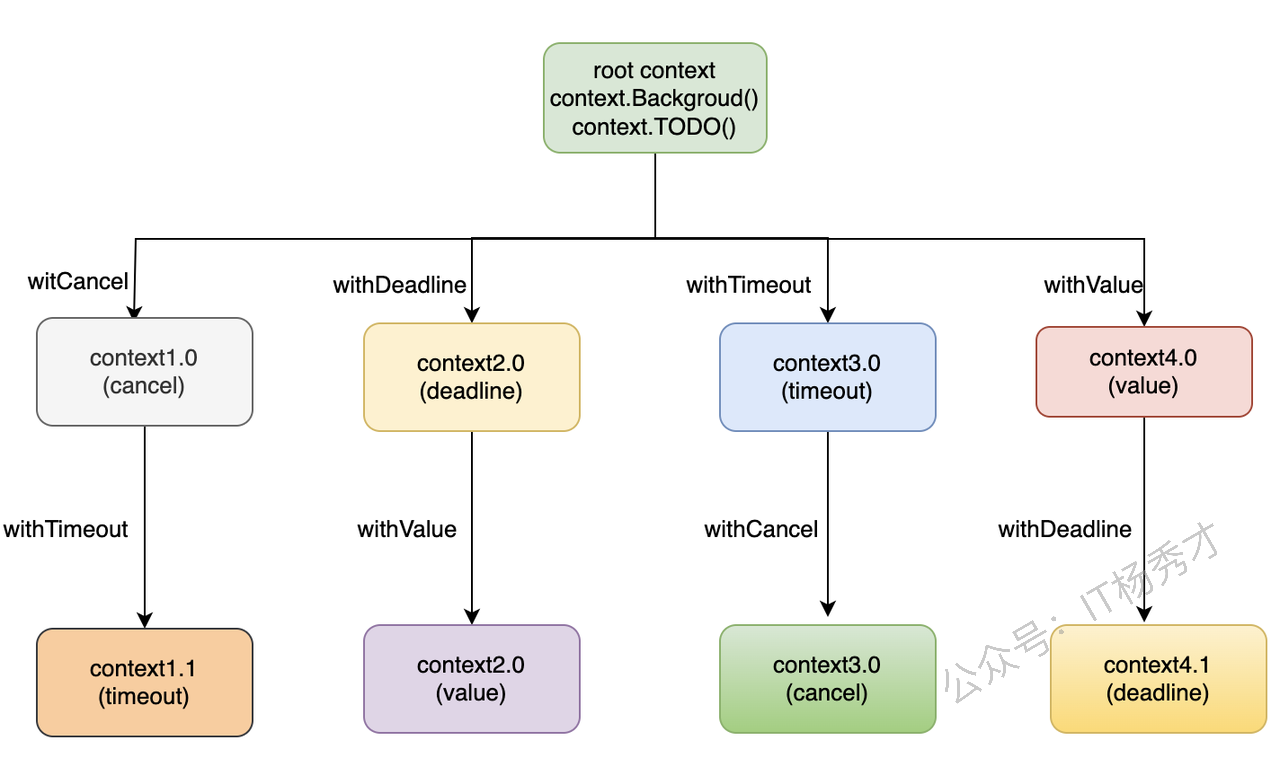
基于当前`context`,每个`with`函数都会创建出一个新的`context`,这样类似于我们熟悉的树结构,当前`context`称为父`context`,派生出的新`context`称为子`context`。就像下面的`context`树结构:
|
||
|
||
|
||
|
||
通过根`context`,通过四个`with`系列方法可以派生出四种类型的`context`,每种`context`又可以通过同样的方式调用`with`系列方法继续向下派生新的`context`,整个结构像一棵树。
|
||
|
||
## Context有什么用
|
||
`context`主要有两个用途,也是在项目中经常使用的:
|
||
1. 用于并发控制,控制协程的优雅退出
|
||
2. 上下文的信息传递
|
||
总的来说,`context`就是用来在父子`goroutine`间进行值传递以及发送`cancel`信号的一种机制。
|
||
|
||
### 并发控制
|
||
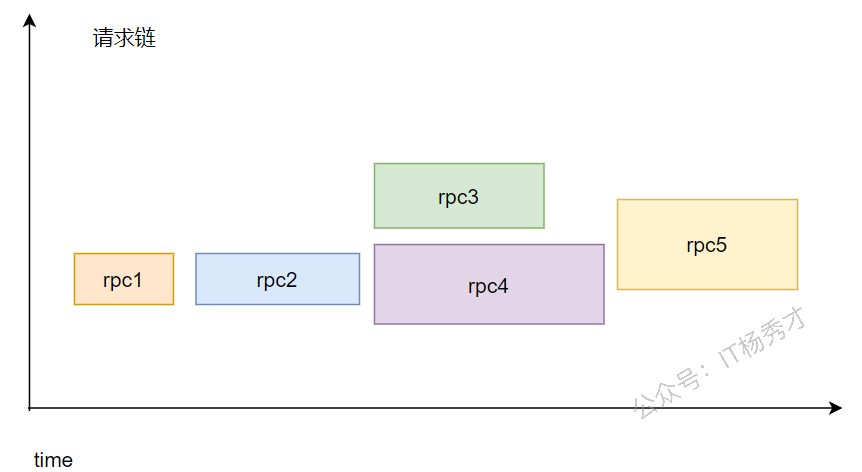
对于一般的服务器而言,都是一致运行着的,等待接收来自客户端或者浏览器的请求做出响应,思考这样一种场景,后台微服务架构中,一般服务器在收到一个请求之后,如果逻辑复杂,不会在一个`goroutine`中完成,而是会创建出很多的`goroutine`共同完成这个请求,就像下面这种情况:
|
||
|
||
|
||
|
||
有一个请求过来之后,先经过第一次`rpc`调用,然后再到`rpc2`,后面创建执行两个`rpc`,`rpc4`里又有一次`rpc`调用`rpc5`,等所有`rpc`调用成功后,返回结果。假如在整个调用过程中,`rpc1`发生了错误,如果没有`context`存在的话,我们还是得等所有的`rpc`都执行完才能返回结果,这样其实浪费了不少时间,因为一旦出错,我们完全可以直接在`rpc1`这里就返回结果了,不用等到后续的`rpc`都执行完。
|
||
假设我们在`rpc1`直接返回失败,不等后续的`rpc`继续执行,那么其实后续的`rpc`执行就是没有意义的,浪费计算和IO资源而已。引入`context`之后,就可以很好的处理这个问题,在不需要子`goroutine`执行的时候,可以通过`context`通知子`goroutine`优雅的关闭。
|
||
|
||
#### context.WithCancel
|
||
方法定义如下:
|
||
```go
|
||
func WithCancel(parent Context) (ctx Context, cancel CancelFunc)
|
||
```
|
||
`context.WithCancel`函数是一个取消控制函数,只需要一个`context`作为参数,能够从`context.Context`中衍生出一个新的子`context`和取消函数`CancelFunc`,通过将这个子`context`传递到新的`goroutine`中来控制这些`goroutine`的关闭,一旦我们执行返回的取消函数`CancelFunc`,当前上下文以及它的子上下文都会被取消,所有的`Goroutine`都会同步收到取消信号。
|
||
使用示例:
|
||
```go
|
||
package main
|
||
|
||
import (
|
||
"context"
|
||
"fmt"
|
||
"time"
|
||
)
|
||
|
||
func main() {
|
||
ctx, cancel := context.WithCancel(context.Background())
|
||
go Watch(ctx, "goroutine1")
|
||
go Watch(ctx, "goroutine2")
|
||
|
||
time.Sleep(6 * time.Second) // 让goroutine1和goroutine2执行6s
|
||
fmt.Println("end watching!!!")
|
||
cancel() // 通知goroutine1和goroutine2关闭
|
||
time.Sleep(1 * time.Second)
|
||
}
|
||
|
||
func Watch(ctx context.Context, name string) {
|
||
for {
|
||
select {
|
||
case <-ctx.Done():
|
||
fmt.Printf("%s exit!\n", name) // 主goroutine调用cancel后,会发送一个信号到ctx.Done()这个channel,这里就会收到信息
|
||
return
|
||
default:
|
||
fmt.Printf("%s watching...\n", name)
|
||
time.Sleep(time.Second)
|
||
}
|
||
}
|
||
}
|
||
```
|
||
运行结果:
|
||
```
|
||
goroutine2 watching...
|
||
goroutine1 watching...
|
||
goroutine1 watching...
|
||
goroutine2 watching...
|
||
goroutine2 watching...
|
||
goroutine1 watching...
|
||
goroutine1 watching...
|
||
goroutine2 watching...
|
||
goroutine2 watching...
|
||
goroutine1 watching...
|
||
goroutine1 watching...
|
||
goroutine2 watching...
|
||
end watching!!!
|
||
goroutine1 exit!
|
||
goroutine2 exit!
|
||
```
|
||
`ctx, cancel := context.WithCancel(context.Background())`派生出了一个带有返回函数`cancel`的`ctx`,并把它传入到子`goroutine`中,接下来在6s时间内,由于没有执行`cancel`函数,子`goroutine`将一直执行`default`语句,打印监控。6s之后,调用`cancel`,此时子`goroutine`会从`ctx.Done()`这个`channel`中收到消息,执行`return`结束。
|
||
|
||
#### context.WithDeadline
|
||
方法定义如下:
|
||
```go
|
||
func WithDeadline(parent Context, d time.Time) (Context, CancelFunc)
|
||
```
|
||
`context.WithDeadline`也是一个取消控制函数,方法有两个参数,第一个参数是一个`context`,第二个参数是截止时间,同样会返回一个子`context`和一个取消函数`CancelFunc`。在使用的时候,没有到截止时间,我们可以通过手动调用`CancelFunc`来取消子`context`,控制子`goroutine`的退出,如果到了截止时间,我们都没有调用`CancelFunc`,子`context`的`Done()`管道也会收到一个取消信号,用来控制子`goroutine`退出。
|
||
使用示例:
|
||
```go
|
||
package main
|
||
|
||
import (
|
||
"context"
|
||
"fmt"
|
||
"time"
|
||
)
|
||
|
||
func main() {
|
||
ctx, cancel := context.WithDeadline(context.Background(),time.Now().Add(4*time.Second)) // 设置超时时间4当前时间4s之后
|
||
defer cancel()
|
||
go Watch(ctx, "goroutine1")
|
||
go Watch(ctx, "goroutine2")
|
||
|
||
time.Sleep(6 * time.Second) // 让goroutine1和goroutine2执行6s
|
||
fmt.Println("end watching!!!")
|
||
}
|
||
|
||
func Watch(ctx context.Context, name string) {
|
||
for {
|
||
select {
|
||
case <-ctx.Done():
|
||
fmt.Printf("%s exit!\n", name) // 4s之后收到信号
|
||
return
|
||
default:
|
||
fmt.Printf("%s watching...\n", name)
|
||
time.Sleep(time.Second)
|
||
}
|
||
}
|
||
}
|
||
```
|
||
运行结果:
|
||
```
|
||
goroutine1 watching...
|
||
goroutine2 watching...
|
||
goroutine2 watching...
|
||
goroutine1 watching...
|
||
goroutine1 watching...
|
||
goroutine2 watching...
|
||
goroutine1 exit!
|
||
goroutine2 exit!
|
||
end watching!!!
|
||
```
|
||
我们并没有调用`cancel`函数,但是在过了4s之后,子`groutine`里`ctx.Done()`收到了信号,打印出`exit`,子`goroutine`退出,这就是`WithDeadline`派生子`context`的用法。
|
||
|
||
#### context.WithTimeout
|
||
方法定义:
|
||
```go
|
||
func WithTimeout(parent Context, timeout time.Duration) (Context, CancelFunc)
|
||
```
|
||
`context.WithTimeout`和`context.WithDeadline`的作用类似,都是用于超时取消子`context`,只是传递的第二个参数有所不同,`context.WithTimeout`传递的第二个参数不是具体时间,而是时间长度。
|
||
使用示例:
|
||
```go
|
||
package main
|
||
|
||
import (
|
||
"context"
|
||
"fmt"
|
||
"time"
|
||
)
|
||
|
||
func main() {
|
||
ctx, cancel := context.WithTimeout(context.Background(), 4*time.Second)
|
||
defer cancel()
|
||
go Watch(ctx, "goroutine1")
|
||
go Watch(ctx, "goroutine2")
|
||
|
||
time.Sleep(6 * time.Second) // 让goroutine1和goroutine2执行6s
|
||
fmt.Println("end watching!!!")
|
||
}
|
||
|
||
func Watch(ctx context.Context, name string) {
|
||
for {
|
||
select {
|
||
case <-ctx.Done():
|
||
fmt.Printf("%s exit!\n", name) // 主goroutine调用cancel后,会发送一个信号到ctx.Done()这个channel,这里就会收到信息
|
||
return
|
||
default:
|
||
fmt.Printf("%s watching...\n", name)
|
||
time.Sleep(time.Second)
|
||
}
|
||
}
|
||
}
|
||
```
|
||
运行结果:
|
||
```
|
||
goroutine2 watching...
|
||
goroutine1 watching...
|
||
goroutine1 watching...
|
||
goroutine2 watching...
|
||
goroutine2 watching...
|
||
goroutine1 watching...
|
||
goroutine1 watching...
|
||
goroutine2 watching...
|
||
goroutine1 exit!
|
||
goroutine2 exit!
|
||
end watching!!!
|
||
```
|
||
程序很简单,与上个`context.WithDeadline`的样例代码基本一样,只是改变了下派生`context`的方法为`context.WithTimeout`,具体体现在第二个参数不再是具体时间,而是变为了4s这个具体的时间长度,执行结果也是一样。
|
||
|
||
#### context.WithValue
|
||
方法定义:
|
||
```go
|
||
func WithValue(parent Context, key, val interface{}) Context
|
||
```
|
||
`context.WithValue`函数从父`context`中创建一个子`context`用于传值,函数参数是父`context`,`key`,`val`键值对。返回一个`context`。
|
||
项目中这个方法一般用于上下文信息的传递,比如请求唯一`id`,以及`trace_id`等,用于链路追踪以及配置透传。
|
||
使用示例:
|
||
```go
|
||
package main
|
||
|
||
import (
|
||
"context"
|
||
"fmt"
|
||
"time"
|
||
)
|
||
|
||
func func1(ctx context.Context) {
|
||
fmt.Printf("name is: %s", ctx.Value("name").(string))
|
||
}
|
||
|
||
func main() {
|
||
ctx := context.WithValue(context.Background(), "name", "zhangsan")
|
||
go func1(ctx)
|
||
time.Sleep(time.Second)
|
||
}
|
||
```
|
||
运行结果:
|
||
```
|
||
name is: zhangsan
|
||
```
|