mirror of
https://github.com/Gmaker689/ai-diff-preview.git
synced 2026-09-27 07:21:51 +08:00

3.3 KiB
3.3 KiB
AI Code Diff Preview
类 Cursor 风格的 AI 代码差异预览 VSCode 插件 — Accept/Reject 审查变更。
使用方法
- 安装
.vsix并重启 VSCode - 将下面配置复制到项目
.claude/settings.json(或~/.claude/settings.json全局生效) - 用 Claude Code 编辑项目 → Stop 后自动弹出 QuickPick 变更列表 → VSCode 内置 Diff 逐文件审查
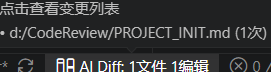 触发AI Diff后快捷键
Ctrl+Shift+D打开QuickPick预览,一键接受/拒绝变更 进入单个
进入单个diff界面可在状态栏右下角选择单个文件接受/拒绝


Claude Code Hooks 必须配置
将以下内容写入 .claude/settings.json:

{
  "hooks": {
    "PostToolUse": [
      {
        "matcher": "Write|Edit",
        "hooks": [
          {
            "type": "command",
            "command": "node -e \"const fs=require('fs'),p=require('path'),d=p.join(process.env.CLAUDE_PLUGIN_ROOT||'.','.claude','hooks');let b='';process.stdin.on('data',c=>b+=c);process.stdin.on('end',()=>{try{const j=JSON.parse(b);const e={type:'edit',filePath:j.tool_input?.file_path||j.tool_response?.filePath||'',content:j.tool_input?.content||'',oldString:j.tool_input?.old_string||'',newString:j.tool_input?.new_string||'',timestamp:Date.now(),toolName:j.tool_name};fs.mkdirSync(d,{recursive:true});const t=p.join(d,'pending.json'),tmp=t+'.tmp';fs.writeFileSync(tmp,JSON.stringify(e));fs.renameSync(tmp,t)}catch{}})\"",
            "timeout": 5
          }
        ]
      }
    ],
    "Stop": [
      {
        "hooks": [
          {
            "type": "command",
            "command": "node -e \"const fs=require('fs'),p=require('path'),d=p.join(process.env.CLAUDE_PLUGIN_ROOT||'.','.claude','hooks');try{fs.mkdirSync(d,{recursive:true});const t=p.join(d,'pending.json'),tmp=t+'.tmp';fs.writeFileSync(tmp,JSON.stringify({type:'stop',filePath:'',content:'',oldString:'',newString:'',timestamp:Date.now(),toolName:'Stop'}));fs.renameSync(tmp,t)}catch{}\"",
            "timeout": 5
          }
        ]
      }
    ]
  }
}
命令
| 命令 | 快捷键 | 功能 |
|---|---|---|
AI Diff: 显示所有变更文件列表 |
Ctrl+Shift+D |
QuickPick 总览 + Accept All / Reject All |
AI Diff: 下一个变更 |
Alt+↓ |
跳转下一个 pending 文件 |
AI Diff: 上一个变更 |
Alt+↑ |
跳转上一个 pending 文件 |
AI Diff: 接受所有变更 |
Ctrl+Shift+A |
Accept All |
AI Diff: 拒绝所有变更 |
Ctrl+Shift+R |
Reject All |
Diff 编辑器打开后,状态栏右侧自动出现 Accept / Reject / 接受全部 按钮。
开发
npm install
npm run build     # 编译
npm run test      # 测试
npm run package   # 生成 ai-diff-preview-*.vsix
许可证
MIT © 2026 Gmaker689